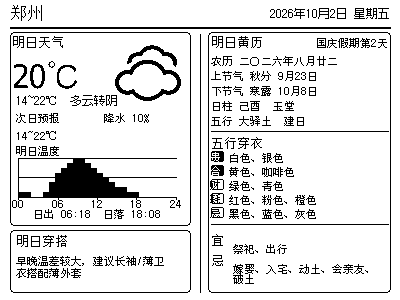
Two-way Microsoft To Do sync with device tasks. This project does not generate a separate ink-card image.
Microsoft To Do Sync
Connect Microsoft To Do with tasks on one or more NOTE4 devices from your Mac.
No flashing · Plugin · Task-list sync
Custom ink cards · NOTE4 · Monochrome
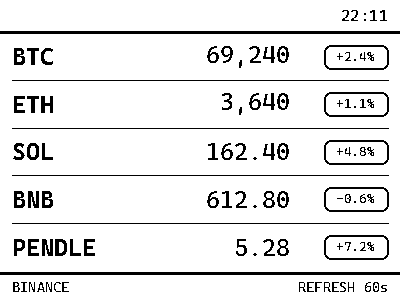
Check public prices and daily changes on a quiet desktop display.

Check public prices and daily changes on a quiet desktop display.
Install & use
Enter a key and give the task to your local AI. AI handles installation, previews and device discovery.
AI uses the key to list your devices; you only need to confirm which one to use.
Sign in to the cloud platform by QR code → use Scan in the mini program's Me tab → open Open API on the website → create an API Key.
A shorter path is planned: Get API in the mini program menu. This entry is not live yet.
Codex on your computer can install dependencies and run programs locally.
After copying, start a new chat in Codex on your computer and paste the task.
Leave it blank if unknown. AI can retrieve it from the official device list, without searching the device menus.
These are image slots 1–5. Before the first push, AI confirms the target device and slot to avoid overwriting existing content.
The Key is only saved in a local connection file and is not included in the AI task.
The key is in your saved local file. This page only remembers the filename and device selection, which you can reuse for another plugin.
This project supports NOTE4 · Monochrome.
The task includes project information, standard API documentation, the connection filename and device selection. The API Key stays in a local file and is never copied into the task.
The device shows the expected TickerPaper Crypto Dashboard screen and continues to work after repeated updates.
AI generates a preview first, then confirms the target device and first update with you. It reports installation location, verification results and how to start again. Continue in the same conversation if anything goes wrong.
NOTE4 with original firmware · ZECTRIX Cloud API · Python · Market-data access
Choose assets and data sources supported by the project and prepare a computer or server running Python. The display is for information.
Keep NOTE4's original firmware. Configure the API Key, device identifier and display options locally using the project instructions.
Check the preview's data source, update time and units before enabling automatic pushes. Current install commands and market-source availability have not been checked in this site.
Information organized · Release version and installation await review. Generating a task does not send it or run an installation automatically.
Displayed prices depend on data sources, program schedules and device polling. Check the displayed time; do not assume they always represent live trades.
No. The project renders content on a computer or server, then pushes it through the ZECTRIX Cloud API.