
ZECTRIX NOTE SERIES / 02
NOTE4C Devkit
A complete ESP32-S3 platform for four-color e-paper
Choose NOTE4C Devkit for four-color labels, photo cards, and status displays that update occasionally. This fully assembled 4.2-inch ESP32-S3 development kit has a 400 × 300 black, white, red, and yellow display. Full refresh typically takes more than ten seconds; use NOTE4 Devkit when black-and-white partial refresh matters more than color.
LAUNCH PRICE · VALID THROUGH OCT 31, 2026
$54.99 USD$69.00 USD
In stock Order from the official ZECTRIX store.
Secure checkout on the official ZECTRIX store. Shipping and taxes are calculated at checkout.
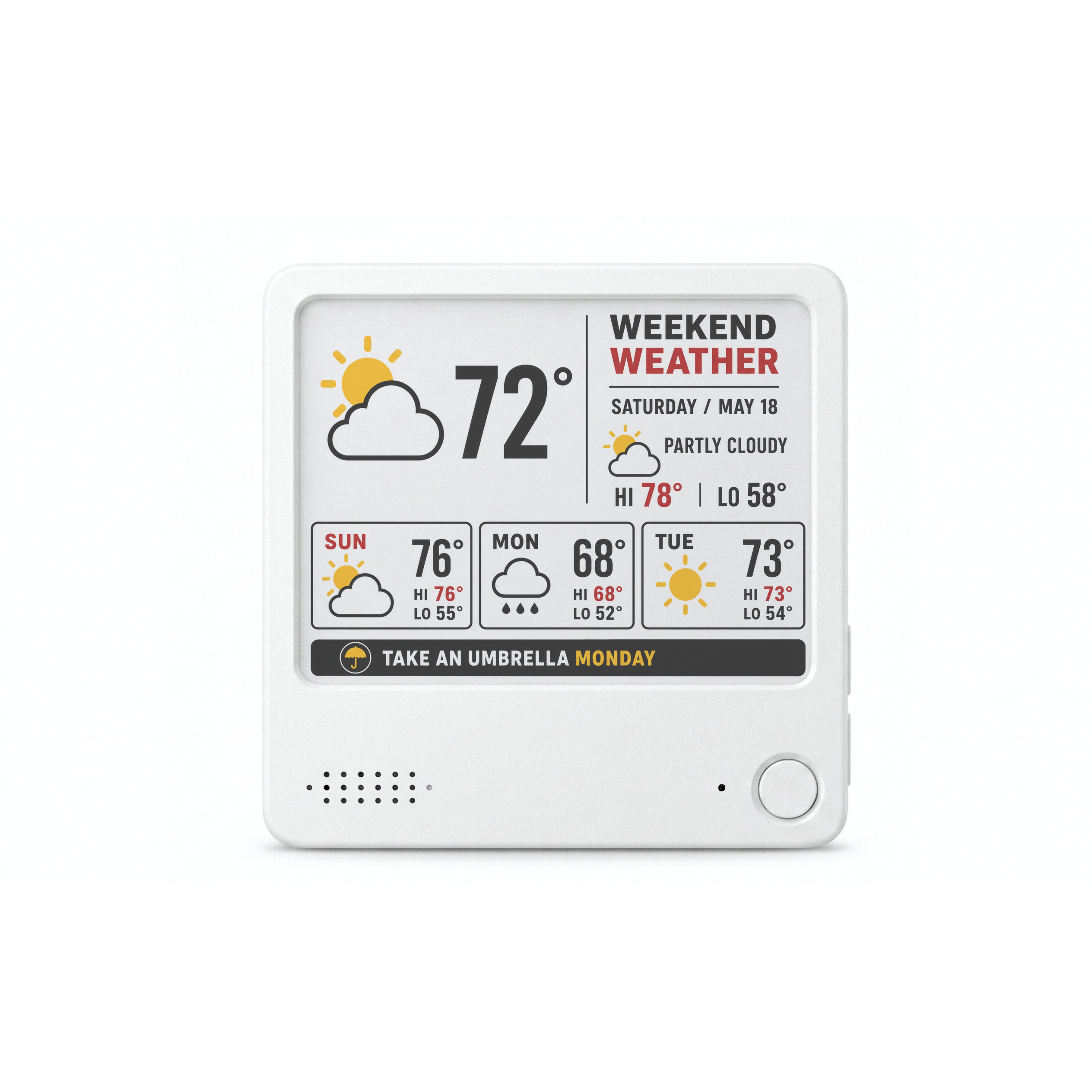 NOTE4C Devkit / FOUR-COLOR E-INK
DISPLAY4.2-inch black, white, red, and yellow display
FORMDisplay, battery, and enclosure assembled
COREESP32-S3 N16R8
OPEN SOURCEFully open reference code
WATCH / EXPLORE / BUILD
See NOTE4C Devkit
in motion.
Product walkthroughs, setup guides, and four-color e-paper experiments—collected in one place. Choose a video to explore NOTE4C Devkit in more detail.
From the community.
01 / 04

James Devonport@jamesdevonport
𝕏Finished my hack project with the tiny e-paper display!

ALEX 💡@ytiralugins
𝕏Just received my NOTE4C! … Cool product so far man @itopinion 🙏

Pechofusil@SergioGMN
𝕏It works for me on the kitchen fridge to see the next meal.
Translated from SpanishView post on X ↗
Tengo juguete nuevo, y este es a color y magnético.
No es tan grande como el otro, pero para pegarlo en la nevera de la cocina y ver la próxima comida me sirve.
He hecho también que hacer doble click en el botón, la comida se marque como consumida y pasa a mostrar la siguiente.
Creo que voy a quitar el apartado de la comida del grande, que siempre lo tengo en mi cuarto, y poner alguna otra cosa.
Quizá stats de los tokens que quemo o alguna otra cosa random. Ya veremos jejej

𝕋𝕆𝕄𝔼𝕂@AIIT83
𝕏Managing the panel via Wi-Fi from a phone, and so on.
ASSEMBLED HARDWARE
Skip the bare board.
Start developing.
NOTE4C Devkit keeps NOTE4's processor, battery, enclosure, interfaces, and mechanical design, replacing the display module with four-color e-paper.
Display, mainboard, battery, enclosure, buttons, and magnetic back form a complete device.
Reference firmware covers Wi-Fi provisioning, image upload and transfer, and four-color display validation.
Spend your time on firmware, data sources, content logic, and peripherals instead of rebuilding the enclosure.
A four-color display on a proven hardware platform.
Designed for individuals and teams with ESP32 experience who want to validate a four-color e-paper product concept.
WHAT TO BUILD
Built for slower updates.
Red and yellow are ideal for emphasizing status, categories, and alerts. Think of it as a low-power static information terminal, not a conventional display that responds every second.
Four-color electronic labels
Use red and yellow to emphasize status, categories, and alerts, giving static labels clearer hierarchy.
Family photos and memory cards
Generate a daily photo, anniversary card, or family reminder from a NAS, album, or other data source.
Desktop AI status board
Display token usage, API calls, cost trends, and service status.
Low-power information display
Show class schedules, calendars, inventory status, room signs, or duty rosters.
Image transfer experiments
Validate image processing, color mapping, transfer workflows, and four-color output.
GPIO peripheral exploration
Connect sensors, buttons, and your own hardware logic to a complete assembled device.
FOUR COLORS, CLEAR SIGNALS
Make color count.
Black and white carry the main content, while red and yellow signal status and emphasis. These examples show possible directions. Actual results depend on your firmware, data sources, and image pipeline.
STATUS BOARD
Desktop AI and service status
Arrange token usage, APIs, cost trends, and service alerts in a static interface that does not need second-by-second updates.
SERVICE STATUS09:30
API USAGE82%
TOKEN BUDGET56%
NAS BACKUPOK
COLOR LABEL
Electronic labels and alerts
Use red and yellow to emphasize categories, priorities, and exceptions.
MEMORY CARD
Photos and memory cards
Update once a day or once an hour to keep family photos and dates visible.
KNOW BEFORE YOU BUILD
Four-color e-paper
is not a real-time display
Its strengths are low power, image retention without power, and static color. The tradeoff is a longer full-screen refresh, with visible flashing and color inversion during refresh as part of normal operation.
10s+A full-screen refresh typically takes more than ten seconds
GOOD FOR: Static labelsGOOD FOR: Occasional statusNOT FOR: Animation or videoNOT FOR: Second-by-second interaction
It is not recommended for live scrolling, frequently refreshed lists, handwriting tracking, or game controls.
OPEN SOURCE BOUNDARY
Reference code gets you started.
The rest is yours to define.
The accompanying reference firmware is open source and covers Wi-Fi provisioning, image upload and transfer, and basic four-color display validation. It is a working development pipeline, not a complete no-code consumer app.
IncludedProvisioning, image transfer, four-color display validation, and an ESP32 development base
Not includedNOTE4 consumer firmware, official AI voice tasks, or integrations for every third-party data source
REFERENCE FIRMWARE / START HERE
01  connect_wifi();
02  receive_image();
03  map_to_4color();
04  refresh_epd();

// BLACK / WHITE / RED / YELLOW
// ESP32-S3 · 400 × 300
// BUILD THE REST YOUR WAY
WHAT IS ASSEMBLED
A complete device,
ready for development
You do not need to assemble the display, power system, flex cables, and enclosure from scratch. Hardware details may vary slightly by production batch.
4.2-inch four-color display, ESP32-S3-N16R8 mainboard, and expansion GPIO.
2,000+ mAh battery, USB Type-C, speaker, microphone, NFC, and status light.
Front and rear enclosure, physical buttons, and magnetic back are fully assembled.
HARDWARE SPECIFICATIONS
Hardware specs.
NOTE4C Devkit is built for developers, so its display capabilities, hardware specifications, and firmware scope are stated plainly.
Display
- Panel
- 4.2-inch E Ink display
- Colors
- Black, white, red, and yellow
- Resolution
- 400 × 300 pixels
- Refresh
- A full-screen image typically takes more than 10 seconds
Core
- Processor
- ESP32-S3, dual-core Xtensa LX7
- Memory
- 16 MB Flash + 8MB PSRAM
- Wireless
- 2.4 GHz Wi-Fi + BLE 5.0
Hardware and enclosure
- Battery
- 2,000+ mAh
- Port
- USB Type-C charging and data
- Peripherals
- Speaker, microphone, NFC, status light, and expansion GPIO
- Dimensions
- 97 mm × 97 mm × 8.75 mm, including magnetic back
Firmware and code
- Consumer firmware
- Does not include NOTE4's official consumer firmware
- Reference firmware
- Includes provisioning, image transfer, and basic four-color display validation
- Code
- All accompanying reference code is open source
- Documentation
- Development resources and Wiki documentation are available online
Product form and support
- Device
- Fully assembled, open four-color e-paper development device
- Commercial warranty
- Not offered. NOTE4C Devkit is a development device. Hardware manufacturing defects may be eligible for support, subject to assessment and applicable law.
FAQ
Common Questions
Should I choose NOTE4 Devkit or NOTE4C Devkit?
Choose NOTE4 Devkit for black-and-white partial refresh and full-screen 16-level grayscale. Choose NOTE4C Devkit for black, white, red, and yellow content that updates occasionally; its full refresh typically takes more than ten seconds. Both are fully assembled 4.2-inch ESP32-S3 development devices. They use different display drivers and require firmware matched to the model. Explore NOTE4 Devkit.
Which open-source projects can I start with?
Start with the four-color reference firmware for image transfer and display validation, FourColor Ink for a gallery and status display, or Paperwake for dashboards delivered over your local network. These projects require model-specific firmware and setup; companion software or external services may be needed.
Can NOTE4C Devkit use NOTE4's AI features?
No. NOTE4C Devkit is a development platform and does not include NOTE4's official consumer firmware or AI voice task experience.
Do I need to assemble the hardware?
No bare-board assembly is required. The display, mainboard, battery, enclosure, and core structure are already assembled, but you must develop the software or flash the reference firmware.
Is the code open source?
Yes. The accompanying reference firmware is open source and covers Wi-Fi provisioning, image transfer, and basic four-color display validation.
Why does a refresh take more than ten seconds?
The four-color pigments are driven in multiple stages to clear ghosting and produce the final image. A full refresh is much slower than partial refresh on a black-and-white display, which is an inherent characteristic of the panel.
Is it suitable for a live dashboard?
It works well for status panels that update occasionally, but not for second-by-second refresh, animation, or continuously scrolling dashboards.
Does NOTE4C Devkit include a product warranty?
No commercial product warranty is offered for NOTE4C Devkit because it is a development device. Hardware manufacturing defects may be eligible for support. Issues caused by custom firmware, flashing, modification, misuse, incompatible accessories, or expected e-paper behavior are assessed separately and may not be covered, subject to applicable law. Contact ZECTRIX Support before returning any device.
BUILD YOUR FOUR-COLOR IDEA
Start your project
with complete hardware
NOTE4C Devkit is in stock. Buy now to go straight to secure checkout.
In stock Order from the official ZECTRIX store.