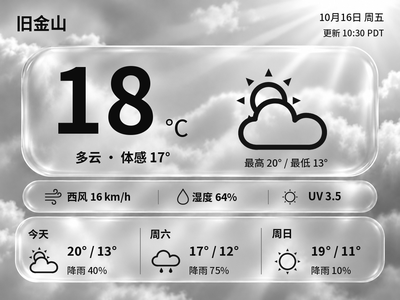
Liquid Glass Weather
Generate Chinese or English glass-style weather cards with temperature, feels-like temperature and a three-day forecast. The current version previews and exports images on your computer first.
Local Push SDK · Public source
Local app · NOTE4
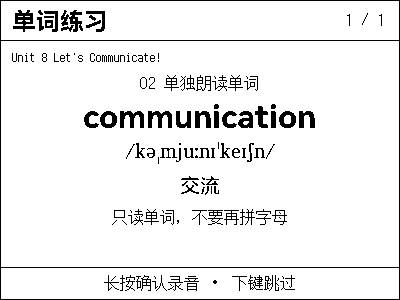
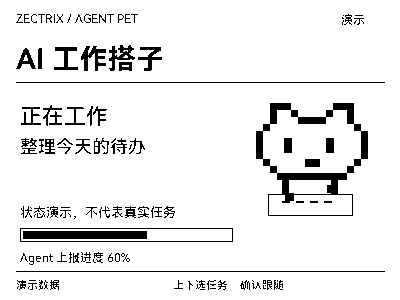
A desktop content scheduler for NOTE4, coordinating multiple channels with priorities, display timing and idle fallback. Supports Python plugins, with weather/clock, a focus timer and a WorkBuddy status daemon using its local API.

Install & use
Install the Windows edition and check the queue in simulation mode before enabling plugins and connecting NOTE4.
NOTE4 local-push firmware · Windows 10/11 x64 installer · Same LAN · Running host; macOS/Linux unverified
The author has built, tested and run it only on Windows. Cross-platform technologies do not establish ready-to-use macOS/Linux support. It uses local-push SDK 0.2 rather than replacing firmware; close other clients holding the NOTE4 connection.
Get InkDeck-0.1.0-Windows-x64-setup.exe from https://cnb.cool/floatingrain-full-stack/inkdeck/-/releases. First launch uses simulation mode: create text/image channels and inspect priorities and fallback. macOS/Linux require your own build, adaptation and testing, using Rust, Node.js 20+, CMake and the platform’s Tauri prerequisites.
Weather/clock and focus-timer sources are in plugins/. Package ZIPs as documented, install under Plugins & Integrations, then enable them. The host downloads uv and prepares Python/dependencies, requiring network access initially; weather needs your own QWeather Key and API Host. tools/buddy-push is a separate WorkBuddy daemon requiring Python/Pillow and hook configuration. Use paths appropriate to your computer.
Keep the computer and NOTE4 on the same LAN with official local-push firmware compatible with the SDK. Switch the overview to a real device, discover it or enter its address. Check priority interruption, minimum dwell, fallback after yielding and button routing. Closing the window leaves it in the tray; quit from the tray to stop.
Give the task to Codex or another local AI and follow the current project README to install and verify it.
Install and verify InkDeck locally following its current README; do not reimplement the host. https://cnb.cool/floatingrain-full-stack/inkdeck https://wiki.zectrix.com/zh/software/local-plugins#inkdeck NOTE4 local-push firmware · Windows 10/11 x64 installer · Same LAN · Running host; macOS/Linux unverified The author has built, tested and run it only on Windows. Cross-platform technologies do not establish ready-to-use macOS/Linux support. It uses local-push SDK 0.2 rather than replacing firmware; close other clients holding the NOTE4 connection. Get InkDeck-0.1.0-Windows-x64-setup.exe from https://cnb.cool/floatingrain-full-stack/inkdeck/-/releases. First launch uses simulation mode: create text/image channels and inspect priorities and fallback. macOS/Linux require your own build, adaptation and testing, using Rust, Node.js 20+, CMake and the platform’s Tauri prerequisites. Weather/clock and focus-timer sources are in plugins/. Package ZIPs as documented, install under Plugins & Integrations, then enable them. The host downloads uv and prepares Python/dependencies, requiring network access initially; weather needs your own QWeather Key and API Host. tools/buddy-push is a separate WorkBuddy daemon requiring Python/Pillow and hook configuration. Use paths appropriate to your computer. Keep the computer and NOTE4 on the same LAN with official local-push firmware compatible with the SDK. Switch the overview to a real device, discover it or enter its address. Check priority interruption, minimum dwell, fallback after yielding and button routing. Closing the window leaves it in the tray; quit from the tray to stop. Check the simulated queue, real-device transitions, buttons and connection release after quitting. Other platforms need separate validation. Preserve existing settings and plugin data; configure keys locally. Provide launch, quit and update instructions. Do not claim installation without local execution.
Check the simulated queue, real-device transitions, buttons and connection release after quitting. Other platforms need separate validation.
Source, installer and author screenshot reviewed · No independent hardware test. Copying the task does not run installation.
Device delivery uses the LAN SDK and needs no Zectrix Cloud API Key. The local HTTP API uses an InkDeck-generated access key, separate from weather credentials. Its default API address is 127.0.0.1:38477.
The hosting endpoint defaults to 127.0.0.1:32342 and implements a protocol subset; existing clients must change their target and be checked. AUDIO_* messages are recorded but not decoded/played, so full audio/voice applications are not automatically compatible. Python plugins run with the current user’s permissions; process isolation is not a security sandbox.
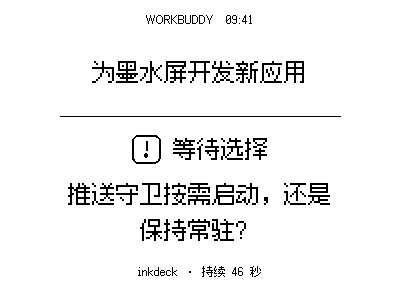
Rendered directly with the original WorkBuddy push daemon and bundled font, showing the waiting-for-choice state with illustrative task content; not a device photograph. Source, plugin documentation and the v0.1.0 Windows download and published SHA-256 were checked; the installer and hardware were not independently run. The author tested only Windows and notes that human code review is incomplete.