Local app · NOTE4

Manila Icon Weather

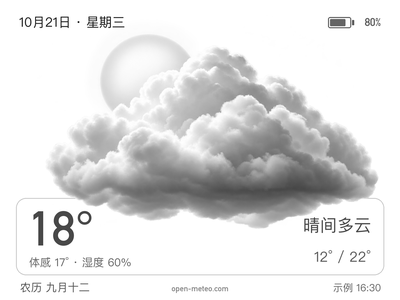
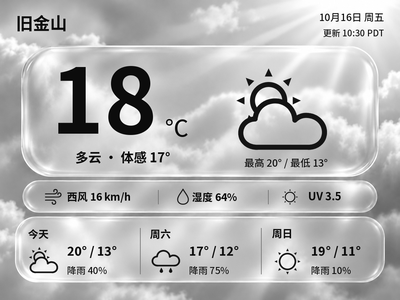
Turn NOTE4 into a 16-level grayscale weather display with temperature, feels-like, humidity, highs and lows, six-hour and seven-day forecasts, and physical-button page switching.

What it can do

16-level grayscale weather illustrations, temperature, feels-like, humidity and highs/lows
Six-hour and seven-day forecast overview
Hourly updates by default and two pages controlled by physical buttons
Local control page for preview, connection and disconnect; no weather API key required

Install & use

Install the local application

The project includes an installer and SDK connection program. Follow its README to prepare dependencies, configure data sources and verify the device output.

Public source

NOTE4 firmware 3.7.2 · Python 3.10+ · Rust / CMake · Same LAN · Host must stay running

The author has validated Apple Silicon macOS. Linux instructions are provided without Linux device validation; Windows requires adaptation. Dates and forecast timezone currently use Asia/Shanghai; other timezones require code changes.

  1. Install project dependencies

    Prepare Python 3.10+, Rust stable, C/C++ build tools and CMake. Clone the repository and run sh install.sh. The SDK is included; the script creates the Python environment, builds the Rust bridge and preserves existing configuration.

  2. Configure the device and city

    Set city, coordinates, device IP and expected_id in config.json. Read and verify the device ID with python3 scripts/device_info.py <device-IP>. Enable Wi-Fi during standby and keep NOTE4 on the same LAN as the host.

  3. Preview before connecting

    Run sh start.sh and open http://127.0.0.1:18772/. Review the preview, then connect the device. Short-press up, down or confirm to switch pages. Disconnect before stopping with Ctrl+C.

Get the Local Push SDK ↗

Give the task to Codex or another local AI and follow the current project README to install and verify it.

See the task for AI
Install and verify Manila Icon Weather on this computer following its README.
https://github.com/wuyinyuanye/note4-weather
https://github.com/wuyinyuanye/note4-weather/blob/main/README.md
NOTE4 firmware 3.7.2 · Python 3.10+ · Rust / CMake · Same LAN · Host must stay running
The author has validated Apple Silicon macOS. Linux instructions are provided without Linux device validation; Windows requires adaptation. Dates and forecast timezone currently use Asia/Shanghai; other timezones require code changes.
Prepare Python 3.10+, Rust stable, C/C++ build tools and CMake. Clone the repository and run sh install.sh. The SDK is included; the script creates the Python environment, builds the Rust bridge and preserves existing configuration.
Set city, coordinates, device IP and expected_id in config.json. Read and verify the device ID with python3 scripts/device_info.py <device-IP>. Enable Wi-Fi during standby and keep NOTE4 on the same LAN as the host.
Run sh start.sh and open http://127.0.0.1:18772/. Review the preview, then connect the device. Short-press up, down or confirm to switch pages. Disconnect before stopping with Ctrl+C.
First review the current README, installer and SDK compatibility. Preserve existing configuration, do not automatically update firmware and do not run multiple device clients together.
Verify the city, temperature and forecast dates, page switching on NOTE4, display-completion acknowledgment and disconnection. A successful image preview alone is not device validation.
Provide start, stop and uninstall instructions. Keep credentials and personal data local. Without local execution access, provide instructions without claiming installation is complete.

After installation, confirm this

Verify the city, temperature and forecast dates, page switching on NOTE4, display-completion acknowledgment and disconnection. A successful image preview alone is not device validation.

After installation, check the actual result on your device. Copying this task does not execute installation.

Frequently asked questions

Does it need firmware flashing or an always-on computer?

The application runs on a computer or compatible host that must remain running. NOTE4 needs compatible official firmware 3.7.2. The installer does not flash firmware or use legacy cloud card slots.

Where does the weather come from, and is the preview live?

Weather comes from Open-Meteo for your configured coordinates and is subject to its service terms. The image shown here is the author’s preview with sample weather and battery data, not live weather or a device photograph.

Project & updates

Public repository. Project information was reviewed on 2026-10-22; supported features depend on the actual version.

Further improvements will be published in the GitHub repository. Before installing or upgrading, ask AI to read the current README and version changes, and preserve existing settings and data.

View source & instructions ↗
Local app · NOTE4Get started →

Your project details will be sent to support@zectrix.com for review before listing. Your email is used only to discuss your submission.