Liquid Glass Weather
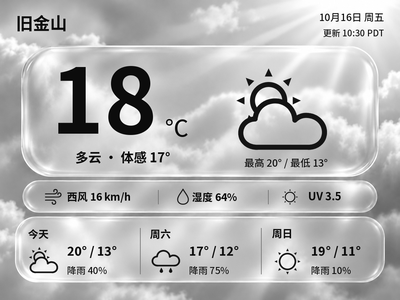
Generate Chinese or English glass-style weather cards with temperature, feels-like temperature and a three-day forecast. The current version previews and exports images on your computer first.
Local Push SDK · Public source
Local app · NOTE4
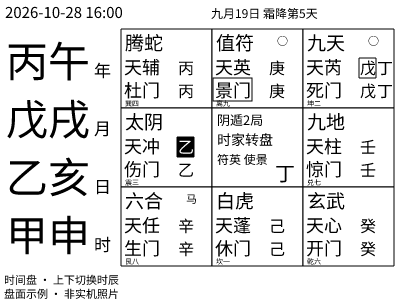
Generate 400×300 nine-palace charts for NOTE4 from a NAS / Docker host, with time-based charts, random sexagenary draws, period navigation and saved charts. Optional MiniMax recognition, interpretation and speech are available in code; the author still records unresolved hardware audio checks.

Install & use
Generate a local preview before configuring the NAS container and your device address. Charts need no API key; voice and AI functions require your own enabled services.
Monochrome NOTE4 · SDK-matched firmware 3.7.2 · Linux NAS / Docker Compose · Same LAN · Optional MiniMax API key
The author targets NOTE4 only, not NOTE4C. The container uses host networking; Node handles charts and service logic, while a Rust bridge calls the bundled SDK. Sixteen-level grayscale is the default. Keep the host running and stop other device clients before connecting.
Use a Linux NAS supporting Docker Compose and host networking; the image uses Node 24 and Rust. For source development, run npm ci and npm run preview with Noto Sans CJK fonts. Current npm test results are 20 of 21 passing; one history page-number rendering assertion fails.
For a new install, copy .env.example to .env and set NOTE4_TARGET to your own LAN IP, not the author’s sample. No key is needed for charts. For voice, enter your own MiniMax key locally and verify ASR, text and TTS permissions. Preserve existing .env and data.
Stop other device clients, run docker compose up -d --build, and check logs, display receipts and buttons. Stop with docker compose stop; resume with docker compose up -d. The author still records continuous-playback failures and unvalidated hold-to-record behavior. Verify chart display first; startup alone does not validate voice.
Give the task to Codex or another local AI and follow the current project README to install and verify it.
https://github.com/yingling686/qimen-note4 https://github.com/yingling686/qimen-note4/blob/main/README.md Monochrome NOTE4 · SDK-matched firmware 3.7.2 · Linux NAS / Docker Compose · Same LAN · Optional MiniMax API key The author targets NOTE4 only, not NOTE4C. The container uses host networking; Node handles charts and service logic, while a Rust bridge calls the bundled SDK. Sixteen-level grayscale is the default. Keep the host running and stop other device clients before connecting. Use a Linux NAS supporting Docker Compose and host networking; the image uses Node 24 and Rust. For source development, run npm ci and npm run preview with Noto Sans CJK fonts. Current npm test results are 20 of 21 passing; one history page-number rendering assertion fails. For a new install, copy .env.example to .env and set NOTE4_TARGET to your own LAN IP, not the author’s sample. No key is needed for charts. For voice, enter your own MiniMax key locally and verify ASR, text and TTS permissions. Preserve existing .env and data. Stop other device clients, run docker compose up -d --build, and check logs, display receipts and buttons. Stop with docker compose stop; resume with docker compose up -d. The author still records continuous-playback failures and unvalidated hold-to-record behavior. Verify chart display first; startup alone does not validate voice. Check display completion, period navigation, random draws and saved data. Separately verify recording, recognition, interpretation and audible playback. Current evidence does not support claiming all tests pass or hardware acceptance is complete.
Check display completion, period navigation, random draws and saved data. Separately verify recording, recognition, interpretation and audible playback. Current evidence does not support claiming all tests pass or hardware acceptance is complete.
Chart preview verified · Hardware voice validation pending. Copying a task does not run installation.
With voice enabled, recordings are packaged in memory and sent to MiniMax recognition; questions and chart context are used for AI interpretation. Raw recordings are not written to disk, but charts, Q&A and interpretations are stored in host SQLite and export files.
We ran Node tests and generated a real 400×300 preview: 20 tests pass and one fails because the expected history page number is not rendered. NAS deployment, Rust bridge build and NOTE4 operation were not tested. The author’s VERIFICATION.md lists unresolved voice checks. No root project license was found; the bundled SDK’s MIT license does not cover the entire project.