Liquid Glass Weather
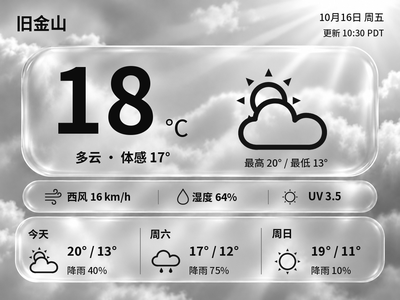
Generate Chinese or English glass-style weather cards with temperature, feels-like temperature and a three-day forecast. The current version previews and exports images on your computer first.
Local Push SDK · Public source
Local app · NOTE4
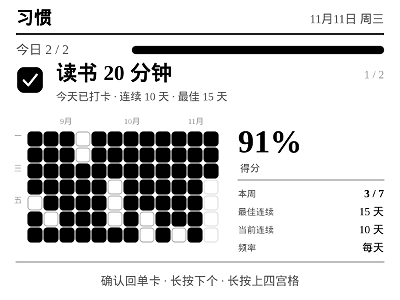
Manage habits on the web and check in with NOTE4 buttons. Choose a single card or an adaptive home screen with 1–4 pinned habits, then review period completion, a 12-week heatmap, streaks and habit scores.

Install & use
Use the included EInk-Push hub to configure and preview habits on the web before connecting NOTE4.
NOTE4 monochrome display · Node.js 22+ / npm · Computer, NAS or Raspberry Pi · Same LAN · Host stays running
This fork of EInk-Push 0.4.4 includes both the hub and Habit; no separate EInk-Push installation is needed. It connects to NOTE4 over LAN v1 without replacing firmware. NOTE4C support is not declared. Check dependencies and device behavior on your own host.
Install Node.js 22+ and npm, clone Ren-Chang/EInk-Push and run npm install in its directory. The repository already includes the hub and Habit; you do not need to download upstream EInk-Push separately.
npm start loads Habit only and redirects http://localhost:8080/ to /apps/habit/. Use npm run start:full to include the six upstream apps alongside Habit. Create habits, set targets and pins, and inspect the 400×300 web preview first.
The initial web password is helloworld; change it on the Device page after signing in. Keep NOTE4 and the host on the same LAN. Save the device address at /device or use npm start -- --device <device-IP>. Stop other device clients before pushing, then verify check-in with confirm, detail with long-up and the next habit with long-down.
Give the task to Codex or another local AI and follow the current project README to install and verify it.
Install Habit from Ren-Chang/EInk-Push following its current README, use the included hub, preserve existing data/ files and do not flash the device automatically. https://github.com/Ren-Chang/EInk-Push https://github.com/Ren-Chang/EInk-Push/blob/main/apps/habit/README.md NOTE4 monochrome display · Node.js 22+ / npm · Computer, NAS or Raspberry Pi · Same LAN · Host stays running This fork of EInk-Push 0.4.4 includes both the hub and Habit; no separate EInk-Push installation is needed. It connects to NOTE4 over LAN v1 without replacing firmware. NOTE4C support is not declared. Check dependencies and device behavior on your own host. Install Node.js 22+ and npm, clone Ren-Chang/EInk-Push and run npm install in its directory. The repository already includes the hub and Habit; you do not need to download upstream EInk-Push separately. npm start loads Habit only and redirects http://localhost:8080/ to /apps/habit/. Use npm run start:full to include the six upstream apps alongside Habit. Create habits, set targets and pins, and inspect the 400×300 web preview first. The initial web password is helloworld; change it on the Device page after signing in. Keep NOTE4 and the host on the same LAN. Save the device address at /device or use npm start -- --device <device-IP>. Stop other device clients before pushing, then verify check-in with confirm, detail with long-up and the next habit with long-down. Verify check-in/undo, detail/grid navigation, web synchronization, persisted records after restart and device connection release on exit.
Verify check-in/undo, detail/grid navigation, web synchronization, persisted records after restart and device connection release on exit.
Documentation and button logic reviewed · Not independently device-tested. Copying the task does not run installation.
This fork of moyubyte/EInk-Push 0.4.4 adds Habit as an app. Habit-only mode is the default; full mode also loads Today, Vocabulary, What to Eat, Life Guide, Pet and Divination. It retains upstream attribution under Apache-2.0.
On the home screen, short-confirm toggles today’s check-in, long-up opens detail and long-down moves to the next habit. In detail, confirm returns to a single card, long-up opens the grid and long-down opens the next habit’s detail. Short up/down remain hub-level app switching.
Habits and check-ins are saved in data/habit/state.json; device settings are in data/config.json. Preserve them during backups and upgrades. Habit pushes through the hub over the LAN without a ZECTRIX Cloud API key; other apps in full mode may need their own service settings.
The preview is the author’s 400×300 detail render using demo history, not real personal records or a device photograph. We reviewed documentation, source and button handling, but did not independently test different NAS systems, computers or devices.