Local app · NOTE4

WorkBuddy Pet

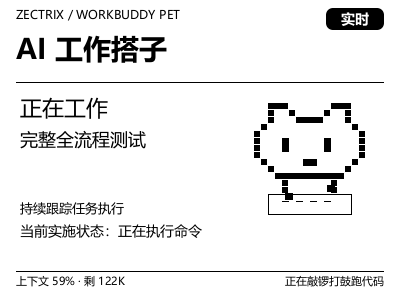
A NOTE4 pixel pet for WorkBuddy. Running on Windows, it follows local tasks, shows status, progress and context usage, and plays alerts when confirmation is needed or work finishes.

What it can do

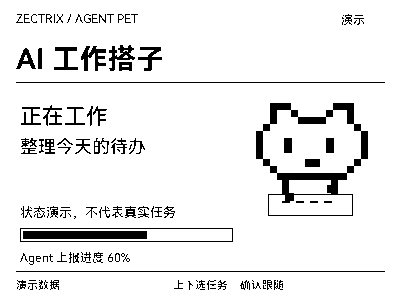
Pixel pet shows working, waiting, completed and error states
Task checklist progress and context usage, with button-based task selection
Connects when tasks are active and releases the device after a grace period

Install & use

Install the local application

Download the single-file Windows x64 executable, or follow the README to build when modifying code. After checking the first frame, enable background task following.

Public source

Windows 10/11 x64 · WorkBuddy · Monochrome NOTE4 · SDK-compatible firmware · Same LAN

The author currently specifies SDK 0.1.0 and firmware 3.7.2. NOTE4C is unsupported; macOS/Linux are unverified. This is a continuously running desktop app, not firmware. We reviewed public documentation only; Windows installation and device operation were not independently tested.

  1. Download or build

    Download the Windows x64 executable from Releases and verify SHA256SUMS.txt. Source builds require Rust MSVC, CMake, Visual Studio C++ Build Tools and the official SDK in a sibling directory. Follow the current README.

  2. Check target and display

    Confirm firmware/SDK compatibility, the same LAN and Wi-Fi retention in standby. Stop other device clients. Run check --target <IP>, wait at least 9 seconds, then push --target <IP> to inspect the display.

  3. Enable and stop following

    Run autostart on --target <IP> to install the current-user startup entry and start following. Check watchdog and daemon status with autostart status. Stop with autostart off; preserve settings and task history when upgrading.

Get the Local Push SDK ↗

Give the task to Codex or another local AI and follow the current project README to install and verify it.

See the task for AI
https://github.com/MuskCheng/zectrix-workbuddy-pet
https://github.com/MuskCheng/zectrix-workbuddy-pet/blob/main/README.md
Windows 10/11 x64 · WorkBuddy · Monochrome NOTE4 · SDK-compatible firmware · Same LAN
The author currently specifies SDK 0.1.0 and firmware 3.7.2. NOTE4C is unsupported; macOS/Linux are unverified. This is a continuously running desktop app, not firmware. We reviewed public documentation only; Windows installation and device operation were not independently tested.
Download the Windows x64 executable from Releases and verify SHA256SUMS.txt. Source builds require Rust MSVC, CMake, Visual Studio C++ Build Tools and the official SDK in a sibling directory. Follow the current README.
Confirm firmware/SDK compatibility, the same LAN and Wi-Fi retention in standby. Stop other device clients. Run check --target <IP>, wait at least 9 seconds, then push --target <IP> to inspect the display.
Run autostart on --target <IP> to install the current-user startup entry and start following. Check watchdog and daemon status with autostart status. Stop with autostart off; preserve settings and task history when upgrading.
After installation, verify task following, context usage, confirmation alerts, completion sounds and device release on stop. This guide is documentation-based, not evidence of independent hardware testing.

After installation, confirm this

After installation, verify task following, context usage, confirmation alerts, completion sounds and device release on stop. This guide is documentation-based, not evidence of independent hardware testing.

After installation, check the actual result on your device. Copying this task does not execute installation.

Frequently asked questions

Can the device approve WorkBuddy actions?

No. The device displays reminders; confirmations must be handled on the computer. Up/down selects tasks or pages, and confirm returns to the home view and automatic following.

How is task status read?

It reads status metadata from local WorkBuddy session files, logs and database. This is not a stable official status API, so format changes may require adaptation. Credit balances and billing data are not displayed.

Project & updates

Public repository. Documentation reviewed on 2026-10-27; actual support depends on the version.

Further improvements will be published in the GitHub repository. Before installing or upgrading, ask AI to read the current README and version changes, and preserve existing settings and data.

View source & instructions ↗
Local app · NOTE4Get started →

Your project details will be sent to support@zectrix.com for review before listing. Your email is used only to discuss your submission.