Custom ink cards · NOTE4 · Monochrome

NBA Schedule & Scores

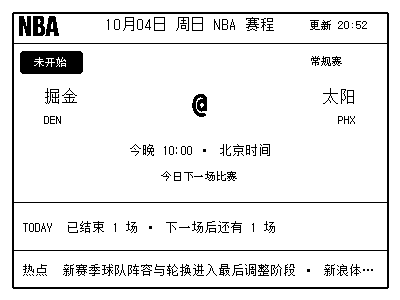
See scores, the next matchup, recent results and one Chinese NBA headline in a fixed layout.

What it can do

See scores, the next matchup, recent results and one Chinese NBA headline in a fixed layout.

Switch content by LIVE / NEXT / FINAL / REST
ESPN scores as the main source, with Chinese headlines
Offline samples, cache fallback and scheduled push

Install & use

Let AI help you install

Enter a key and give the task to your local AI. AI handles installation, previews and device discovery.

1

Connect NOTE and hand over to AI

Just an API Key; AI can find the MAC

AI uses the key to list your devices; you only need to confirm which one to use.

Open the cloud platform to get a key ↗
How do I get it now?

Sign in to the cloud platform by QR code → use Scan in the mini program's Me tab → open Open API on the website → create an API Key.

A shorter path is planned: Get API in the mini program menu. This entry is not live yet.

Codex on your computer can install dependencies and run programs locally.

After copying, start a new chat in Codex on your computer and paste the task.

Specify device and ink-card slot (optional)

Leave it blank if unknown. AI can retrieve it from the official device list, without searching the device menus.

These are image slots 1–5. Before the first push, AI confirms the target device and slot to avoid overwriting existing content.

The Key is only saved in a local connection file and is not included in the AI task.

Standard API documentation ↗Latest documentation ↗

Computer, device and project requirements

This project supports NOTE4 · Monochrome.

  • NOTE4 with original firmware · Python 3 on computer / VPS · Pillow / CairoSVG · Your own API Key
See the task for AI

The task includes project information, standard API documentation, the connection filename and device selection. The API Key stays in a local file and is never copied into the task.

2

After installation, check this

The sports dashboard appears on NOTE. Running again updates fixtures or scores.

AI generates a preview first, then confirms the target device and first update with you. It reports installation location, verification results and how to start again. Continue in the same conversation if anything goes wrong.

Know the process? View manual steps and source

NOTE4 with original firmware · Python 3 on computer / VPS · Pillow / CairoSVG · Your own API Key

  1. Prepare a computer or VPS

    The NBA program runs on your computer or VPS; NOTE4 does not need reflashing. The host must reach the sports and news sources and ZECTRIX Cloud.

  2. Install and initialize

    Use the README's VPS installation command below to prepare dependencies. Enter your API Key, device identifier and page number interactively. The default page is 3, and configuration is saved in your user directory.

  3. Check the display in stages

    Generate an offline sample first, then fetch online data without uploading. Confirm the date, game status and Chinese headlines before pushing through the cloud. Cached data may be used if upstream sources are temporarily unavailable.

  4. Schedule around your needs

    The current README recommends a minimum interval of 10 minutes and provides a script that lowers frequency based on game status. Actual device updates also depend on polling; this is not a second-by-second live feed.

1. Install dependencies on your computer / VPS
mkdir -p ~/services
cd ~/services
git clone https://github.com/happynailinzz/zectrix-nba-board.git
cd ~/services/zectrix-nba-board
python3 -m venv .venv
.venv/bin/python -m pip install --upgrade pip
.venv/bin/python -m pip install -r requirements.txt
2. Configure your device interactively
.venv/bin/python scripts/init.py
3. Offline sample (no network access or upload)
.venv/bin/python scripts/nba_board.py --offline-sample --output /tmp/nba-sample.png
4. Live preview (network access, no upload)
ZECTRIX_NO_PUSH=1 .venv/bin/python scripts/nba_board.py --output /tmp/nba-live-check.png
5. Push to your own device after confirmation
.venv/bin/python scripts/nba_board.py
Full instructions on GitHub ↗In-depth development documentation ↗

Public README checked · Local deployment and physical-screen push await verification. Generating a task does not send it or run an installation automatically.

Frequently asked questions

Do NBA data sources require another API Key?

Current default sports and news sources are public and need no additional sports API Key. Pushing to your NOTE4 still requires a ZECTRIX API Key.

Does it continuously rotate through multiple pages?

The project keeps one fixed layout and changes the main card according to game status during sync.

Why are sports updates delayed or showing older results?

Data sources, network access, scheduling and device polling all affect updates. The project uses the last successful cache when a source is unavailable; check the update time.

About this project

Author: happynailinzz. Community projects are maintained by their authors; support depends on the selected version.

Source & release history ↗
NOTE4 · MonochromeInstall with AI →

Project drafts are saved only in this browser and have not been submitted for review. You can export a file; this page does not send it to a server.