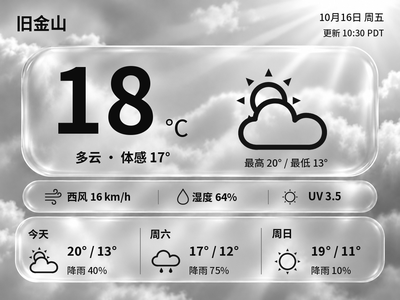
Liquid Glass Weather
Generate Chinese or English glass-style weather cards with temperature, feels-like temperature and a three-day forecast. The current version previews and exports images on your computer first.
Local Push SDK · Public source
Local app · NOTE4
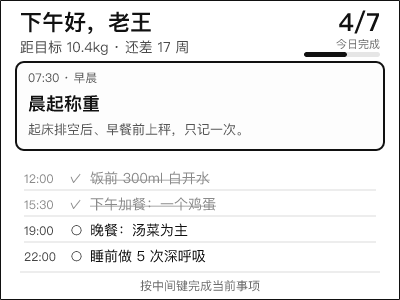
Push daily plans to NOTE4 across five time slots and check in with the middle button. A companion WeChat Mini Program provides weekly reports and device management; the backend can generate and adjust plans based on recent completion. Requires a self-hosted backend and LAN agent.

Install & use
Check the backend and images in mock mode first, then connect your NOTE4 and WeChat Mini Program.
Monochrome NOTE4 · Firmware 3.7.5 / SDK 0.2.0 · Always-on computer or NAS · Node.js 20+, Rust, CMake · WeChat DevTools
The agent must share the NOTE4 LAN. Enable the device’s keep-connected setting and avoid simultaneous management clients. Follow the author’s host-network setup for containers. Device images use local push, not Zectrix Cloud Open API; NOTE4C support is not declared.
Follow DEPLOY.md to install Node.js 20+, Rust stable, CMake, a C/C++ toolchain and Chinese fonts. Fetch the separately maintained official SDK with scripts/fetch-sdk.sh, then configure your network addresses using LAN_DEPLOY.md.
Initialize the database and start the backend as documented, retaining AI_PROVIDER=mock and WECHAT_MOCK=1 for a demo. Import miniprogram into WeChat DevTools and set your API address. Real use requires your own accounts, service credentials and HTTPS domain.
Build the agent and pair it using a code from the Mini Program. Check rendered images with --dry-run before starting with your backend address and NOTE4 IP. Verify image delivery, button check-ins and reporting; configure and test real AI and WeChat subscriptions separately.
Give the task to Codex or another local AI and follow the current project README to install and verify it.
https://github.com/luyk992377193/slimfit https://github.com/luyk992377193/slimfit/blob/main/docs/DEPLOY.md Monochrome NOTE4 · Firmware 3.7.5 / SDK 0.2.0 · Always-on computer or NAS · Node.js 20+, Rust, CMake · WeChat DevTools The agent must share the NOTE4 LAN. Enable the device’s keep-connected setting and avoid simultaneous management clients. Follow the author’s host-network setup for containers. Device images use local push, not Zectrix Cloud Open API; NOTE4C support is not declared. Follow DEPLOY.md to install Node.js 20+, Rust stable, CMake, a C/C++ toolchain and Chinese fonts. Fetch the separately maintained official SDK with scripts/fetch-sdk.sh, then configure your network addresses using LAN_DEPLOY.md. Initialize the database and start the backend as documented, retaining AI_PROVIDER=mock and WECHAT_MOCK=1 for a demo. Import miniprogram into WeChat DevTools and set your API address. Real use requires your own accounts, service credentials and HTTPS domain. Build the agent and pair it using a code from the Mini Program. Check rendered images with --dry-run before starting with your backend address and NOTE4 IP. Verify image delivery, button check-ins and reporting; configure and test real AI and WeChat subscriptions separately. Check display, buttons, reporting and configured services against the deployment guide; a working demo does not establish hardware or production-service verification.
Check display, buttons, reporting and configured services against the deployment guide; a working demo does not establish hardware or production-service verification.
Source and author preview reviewed · Device display and Mini Program UI not verified. Copying the task does not run the installation.
The default mock mode supports demos but does not call real AI or send WeChat notifications. Real AI needs its service key; production WeChat use needs your own AppID, Secret, domain and subscription template. This is not a ready-made hosted service.
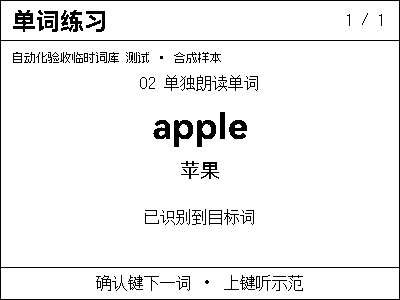
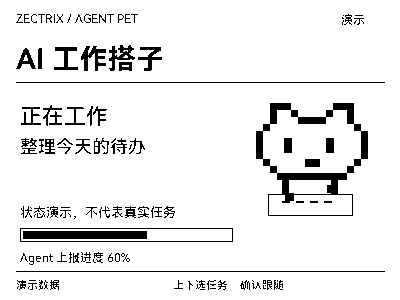
The preview is the author’s 400×300 sample task screen, not our device photograph. Source and deployment documentation were reviewed. The README still marks device display and Mini Program UI verification as pending; we have not tested hardware either. Original project code is MIT-licensed.