Liquid Glass Weather
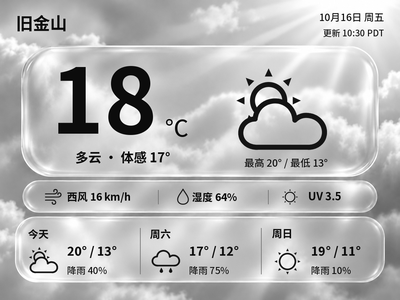
Generate Chinese or English glass-style weather cards with temperature, feels-like temperature and a three-day forecast. The current version previews and exports images on your computer first.
Local Push SDK · Public source
Local app · NOTE4
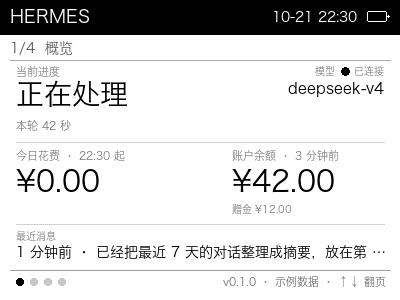
A desktop companion display for personal AI assistants: progress, model, connection, daily spending and balance, plus seven-day stats, scheduled tasks and recent conversations.

Install & use
The project includes an installer and SDK connection program. Follow its README to prepare dependencies, configure data sources and verify the device output.
NOTE4 · macOS + Python 3 · Rust / CMake · Same LAN · Computer must stay running
The author reports validation on Apple Silicon macOS; Windows and Linux are unverified. Reads local Hermes data or JSON from other assistants. Sample data is shown when real data is unavailable.
Read the repository README and prepare Python 3, Rust and CMake. Use SDK-compatible NOTE4 firmware, join the same LAN as the Mac and enable Wi-Fi during standby.
Clone the repository, then run ./install.sh <device-IP> in its directory. The script fetches the SDK, builds the sender and registers three LaunchAgents for rendering, sending and log rotation; it installs missing CMake via pip.
Hermes is the default source. For another assistant, copy config.example.json to config.json, set source=json and supply data using stats.example.json. Check the sample-data label, real spending and balance, page navigation and refresh.
Give the task to Codex or another local AI and follow the current project README to install and verify it.
Install and verify Personal AI Assistant Status Display on this computer following its README. https://github.com/JerryLiu720/zectrix-agent-status https://github.com/JerryLiu720/zectrix-agent-status/blob/main/README.md NOTE4 · macOS + Python 3 · Rust / CMake · Same LAN · Computer must stay running The author reports validation on Apple Silicon macOS; Windows and Linux are unverified. Reads local Hermes data or JSON from other assistants. Sample data is shown when real data is unavailable. Read the repository README and prepare Python 3, Rust and CMake. Use SDK-compatible NOTE4 firmware, join the same LAN as the Mac and enable Wi-Fi during standby. Clone the repository, then run ./install.sh <device-IP> in its directory. The script fetches the SDK, builds the sender and registers three LaunchAgents for rendering, sending and log rotation; it installs missing CMake via pip. Hermes is the default source. For another assistant, copy config.example.json to config.json, set source=json and supply data using stats.example.json. Check the sample-data label, real spending and balance, page navigation and refresh. First review the current README, installer and SDK compatibility. Preserve existing configuration, do not automatically update firmware and do not run multiple device clients together. Check all four pages, up/down navigation and confirm-key refresh on NOTE4. Identify real versus sample data and verify that stopping releases the device connection. Provide start, stop and uninstall instructions. Keep credentials and personal data local. Without local execution access, provide instructions without claiming installation is complete.
Check all four pages, up/down navigation and confirm-key refresh on NOTE4. Identify real versus sample data and verify that stopping releases the device connection.
After installation, check the actual result on your device. Copying this task does not execute installation.
It is designed for personal AI assistants in general. Hermes reading is built in; other assistants can provide the documented JSON format. It does not automatically connect to every assistant or provider account.
Run ./scripts/zectrix off to disconnect and stop, or ./scripts/uninstall.sh to remove the LaunchAgents. Manage startup in macOS Login Items and preserve your configuration when installing or updating.